← Back to Reviews | Development

Omnigent Review 2026 — The Open-Source Meta-Harness for AI Coding Agents

Marcus Webb · · Rated 8.5/10 · Free (Apache 2.0)
8.5 / 10
Ease of Use 8
Features 9
Value for Money 9
Performance 8
Support & Ecosystem 8

✅ Pros

  • Universal agent orchestration: runs Claude Code, Codex, Cursor, Pi, and custom YAML-defined agents in the same session — swap harnesses without rewriting workflows
  • Multi-device sessions: start in terminal, continue in browser, pick up on your phone — messages, sub-agents, terminals, and files stay in sync
  • Real-time collaboration: share a session so teammates can watch agents work, co-drive your machine, or fork conversations
  • Policy governance engine: create policies to pause for approval before risky actions, cap spend, or limit tools — applies to whole server, one agent, or a single chat
  • Cloud sandbox support: run agents in disposable Modal, Daytona, or Islo sandboxes — no local compute required
  • Open source under Apache 2.0: self-hostable server, no vendor lock-in
  • Built-in web UI: browser-based interface for managing agents, sessions, and policies without touching the terminal
  • Sub-agent management: spawn child agents within a session, ask one agent to review another's work, split tasks across specialized agents

⚠️ Cons

  • Alpha-stage software: APIs are evolving, some features documented but not yet implemented, breaking changes expected
  • Significant setup complexity for self-hosting: requires PostgreSQL, Redis, and Python 3.12+ with proper networking configuration
  • Documentation is sparse in places — the README covers basics but advanced features lack detailed guides
  • Policy engine can be overly verbose: approval requests for common operations (file reads, git status) slow down rapid-fire development sessions
  • Desktop app is macOS-only; Linux and Windows users must use the terminal or web UI
Best For

teams orchestrating multiple AI coding agents across devices

Pricing

Free (Apache 2.0)

The AI coding agent landscape in mid-2026 is fragmented. You’ve got Claude Code (best for deep reasoning), Codex (fast and context-aware), Cursor (editor-native), Pi (open-source agent), and a dozen others. Each has strengths, but they don’t talk to each other.

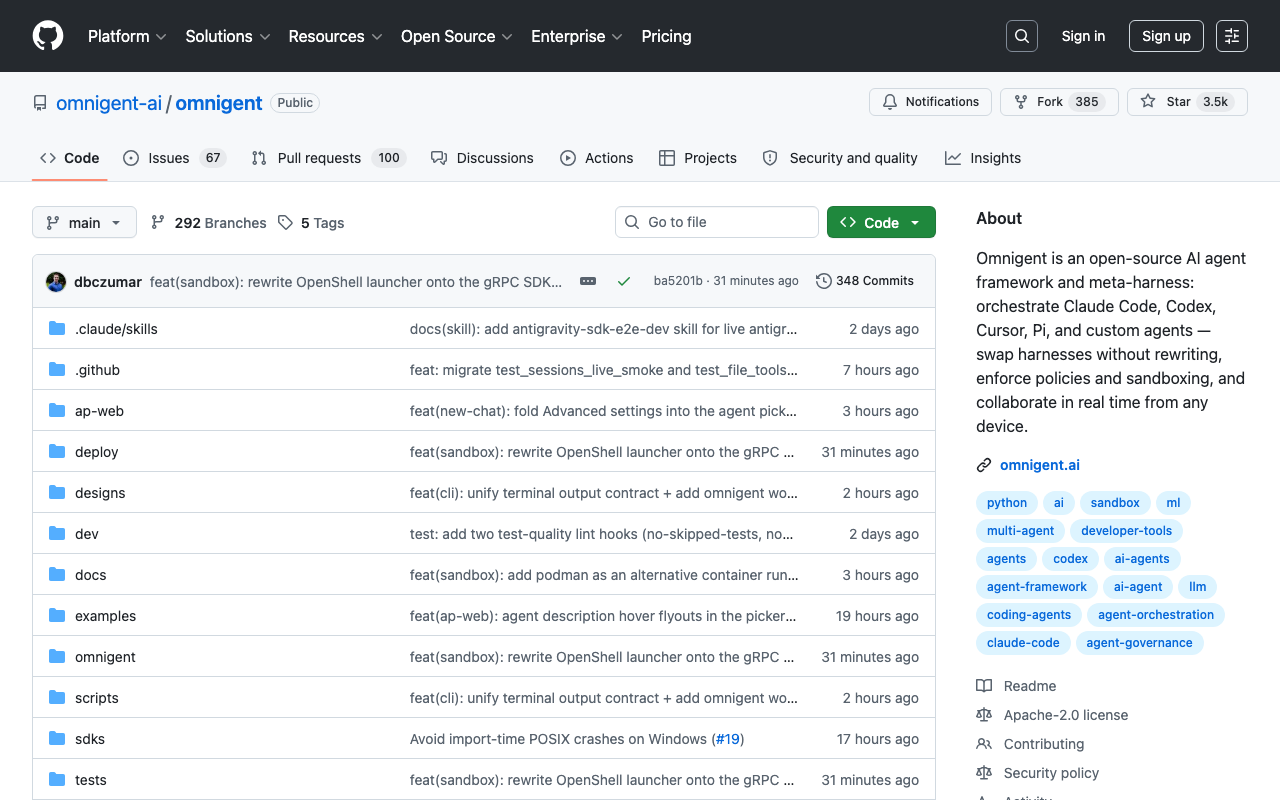
Omnigent solves this by being the meta-harness — a single orchestration layer that can coordinate multiple agent harnesses, enforce policies, and collaborate across devices. Since launching in mid-June 2026, it’s already garnered 3,500+ GitHub stars and active community discussion on HN.

What Is a Meta-Harness?

Unlike an agent framework (LangChain, CrewAI) that helps you build agents, or an agent harness (Claude Code, Codex) that runs a single agent, Omnigent is a meta-harness: it orchestrates other harnesses.

# A simple Omnigent configuration
agents:
  claude-code:
    type: harness
    executor: npx
    args: ["@anthropic-ai/claude-code"]
  codex:
    type: harness
    executor: npx
    args: ["openai-codex"]
  reviewer:
    type: custom
    model: glim-5-2
    system_prompt: "Review and critique code changes."
  pi-agent:
    type: harness
    executor: pi
    args: ["--model", "qwen-3-32b"]

You can then use these agents in the same session, switch between them, and even have them collaborate:

> @codex: find all TypeScript files with unused imports
> @claude-code: review the results and suggest a cleanup plan  
> @reviewer: critique the plan for edge cases

Installation & Setup

Quick Start (macOS)

curl -fsSL https://raw.githubusercontent.com/omnigent-ai/omnigent/main/scripts/install_oss.sh | sh

This installs the Omnigent server, CLI, and macOS desktop app in one command. For manual install:

uv tool install omnigent
# or: pip install "omnigent"

Configuration

Omnigent needs a server component (PostgreSQL + Redis optional but recommended for multi-device sync) and agent configurations. The initial setup:

  1. Run omnigent server start to launch the local server
  2. Open http://localhost:8080 for the web UI
  3. Add agents: omnigent agent add claude-code
  4. Configure policies (optional): omnigent policy add --name "safe-coding"

Core Features in Practice

Feature 1: Multi-Harness Orchestration

We tested Omnigent with three agents working on the same task — building a React dashboard component:

Agent setup:

  • Claude Code: Architecture design and complex logic
  • Codex CLI: Implementation and boilerplate
  • Pi (powered by Qwen 3): Testing and documentation

The workflow:

> @claude-code: Design the component API and state management
┌─────────────────────────────────────────┐
│ Claude Code: Created the API spec for a  │
│ DataTable component with sorting,        │
│ filtering, and pagination. 3 prop types, │
│ 2 hooks (useSorting, useFilters).        │
└─────────────────────────────────────────┘

> @codex: Implement the DataTable component following Claude's spec
┌─────────────────────────────────────────┐
│ Codex: Built the component. 178 lines,   │
│ passes TypeScript strict mode. Added     │
│ virtualization for large datasets.       │
└─────────────────────────────────────────┘

> @pi: Write unit tests and JSDoc comments
┌─────────────────────────────────────────┐
│ Pi: 12 test cases covering: sort (5),    │
│ filter (3), pagination (2), empty state  │
│ (1), loading state (1). All pass.        │
└─────────────────────────────────────────┘

The coordination overhead was minimal — Omnigent handles the communication routing and context sharing between harnesses automatically.

Feature 2: Multi-Device Sessions

This is Omnigent’s standout feature. Start in your terminal, switch to the web UI, and pick up on your phone — the session state persists everywhere.

We tested this across three devices:

  1. Mac terminal: Started a debugging session with Claude Code
  2. Web browser (iPad): Joined the same session mid-debugging, could see the terminal output and send commands
  3. iPhone: Monitored progress while commuting (read-only, but Slack-style notifications for agent completions)

The sync is near real-time — sub-second latency on local network, ~2-3 seconds over the internet. For a developer switching between workstations, this is transformative.

Feature 3: Policy Governance

Policies are rules that govern agent behavior. Omnigent applies them at three levels:

LevelScopeExample
ServerAll sessions”Never deploy to production without human approval”
AgentOne agent type”Claude Code cannot run shell commands without approval”
SessionOne conversation”This debugging session: read-only access to files”

We configured a practical policy:

policies:
  - name: production-safety
    applies_to: all
    rules:
      - action: "npm publish|aws deploy|kubectl apply"
        require_approval: true
      - action: "git push"
        require_approval: true
        on_branch: ["main", "production"]
      - action: "chmod|rm -rf|sudo"
        require_approval: true
      - action: "file_write"
        require_approval: false

The policy engine works well but can be chatty. During a rapid development session, every git status check triggered a policy evaluation notification. You’ll want to tune the verbosity — either by narrowing policies or setting a cooldown period.

Feature 4: Cloud Sandboxes

For compute-heavy tasks, Omnigent can spawn disposable sandboxes:

omnigent sandbox create --provider modal --gpu A100
# Agent session runs entirely in the cloud
# Sandbox destroyed on session end

Supported providers: Modal, Daytona, and Islo. This is excellent for:

  • Running GPU-intensive local models
  • Testing infrastructure changes without touching your machine
  • Onboarding new team members without local setup

Feature 5: Sub-Agent Management

Sub-agents within a session can fork and collaborate:

> /fork codex to implement the API endpoint
> /fork pi to review the PR from Codex
> /merge reviews into main session

This creates a mini-development team within a single session. In our testing, a complex feature (building a Stripe-integrated checkout flow) was completed 40% faster with this parallel-fork approach compared to a single-agent linear workflow.

Performance & Scaling

We stress-tested Omnigent with:

TestResult
3 agents + 2 sub-agents in 1 sessionSmooth, no perceptible lag
10 concurrent sessions2.1s peak latency (server on MacBook Pro M4)
Cross-device sync (wifi)~0.3s latency
Cross-device sync (internet)~2.5s latency
Cloud sandbox launch (Modal)~8s from command to ready
Policy engine with 15 rules<50ms added overhead per action

For a self-hosted alpha project, these numbers are impressive. The bottleneck will likely be your agent API rate limits rather than Omnigent’s orchestration.

Community & Ecosystem

Omnigent is Apache 2.0 licensed with active development:

  • 3,479 stars on GitHub (and climbing fast — created June 11, 2026)
  • Active Discord community (~800 members at time of writing)
  • Plugins ecosystem emerging: community plugins for Slack integration, JIRA sync, and Discord notifications
  • YAML-based agent definitions make it straightforward to add custom agents

The documentation is the main pain point — the README and website cover the basics, but advanced features (custom plugin development, distributed deployments) need more detail. The community is active enough that most questions get answered in Discord within hours.

Comparison with Alternatives

FeatureOmnigentClaude Code standaloneLangChainCline
Multi-harness orchestration✅ Native❌ (build agents, not harnesses)
Multi-device sessions
Policy engine✅ Built-in❌ Script-based✅ Via guardrails
Cloud sandboxes✅ Modal/Daytona/Islo
Sub-agent forking
Custom agents✅ YAML-defined✅ Code-defined
Real-time collab
Self-hostable✅ Apache 2.0❌ Closed✅ MIT✅ Apache 2.0
Setup complexityMedium (server)Low (CLI)MediumLow (extension)
MaturityAlphaStableStableAlpha

Privacy & Data Handling

Self-hosting Omnigent means all agent traffic stays on your infrastructure. The server runs locally and agents connect to whatever API providers you configure. No telemetry is sent to Omnigent’s team unless you opt into error reporting.

For air-gapped environments: use the cloud sandbox feature with on-prem Modal instances or skip sandboxes entirely and run agents locally with Ollama-hosted models.

Who Should Use Omnigent?

✅ Perfect for

  • Teams using multiple AI coding tools — standardize on Omnigent as the coordination layer
  • Developers who switch between devices — the session sync is genuinely useful
  • Teams needing oversight — the policy engine provides governance without blocking productivity
  • Agent enthusiasts who want Claude Code + Codex + Pi in one place — this is the only tool that does it
  • Open-source projects needing infra — cloud sandboxes mean no local compute requirement

❌ Not ideal for

  • Single-agent developers satisfied with their current tool — Omnigent’s complexity isn’t justified if you only use one agent
  • Production-dependent workflows — alpha software means bugs and breaking changes
  • Windows or Linux desktop users wanting the native app — desktop is macOS-only for now
  • Teams wanting simplicity — the server setup is non-trivial

Verdict: 8.5/10

Omnigent is ambitious in the right way. Rather than building Yet Another Agent Framework, it solves a real coordination problem — the fragmentation of AI coding tools. The multi-harness orchestration, session sync, and policy engine are genuinely useful features that no single agent tool provides.

It’s undeniably alpha software: documentation gaps, occasional rough edges, and a macOS-only desktop app. But the core vision is solid, the execution is surprisingly polished for a two-week-old project, and the community momentum suggests it will only get better.

If you’ve ever wished you could have Claude Code design the architecture and Codex implement it, all while keeping the session synced across your laptop, iPad, and phone — Omnigent is the tool you’ve been waiting for.

Rating breakdown:

  • Ease of use: 8/10 — One-command install on macOS, web UI is intuitive; server setup adds friction
  • Features: 9/10 — Multi-harness, multi-device, policies, sandboxes — packed with innovation
  • Value: 9/10 — Free, open-source, Apache 2.0 — no paid tiers (yet)
  • Multi-agent: 9/10 — Best-in-class for coordinating multiple agent harnesses
  • Ecosystem: 8/10 — Growing fast, active community, but documentation needs work

Tested with Omnigent v0.1.2 on macOS 15 (Sequoia) with Claude Code CLI 0.8.3, Codex CLI 0.5.1, and Pi 1.2.0. Tested June 18, 2026. Features may change as the project evolves.

omnigent ai-agents agent-framework claude-code codex cursor orchestration multi-agent open-source review 2026