Kitter Review 2026 — A Rust Desktop App That Keeps One Agent-Skill Library and Links Only What Each Project Needs
✅ Pros
- • It solves a problem that got real the moment agents multiplied: with Claude Code, Codex, Cursor, Copilot and more each discovering skills from their own directories, keeping the same skill in sync across projects by copy-paste is exactly how you end up with three divergent versions of sw-dialogue and no idea which one is live
- • Managed links instead of copies is the right primitive: a project links to the same maintained skill source, so one update reaches every linked installation, and each project can still run its own skill set without creating update drift in the process
- • The Projects view is the feature that earns the install — it shows the complete effective skill set for every agent, including installations discovered outside Kitter (project, parent, user-level, built-in and plugin-provided), each with its source, so the 'what does my agent actually see right now' question finally has an answer
- • It is genuinely native and small: built in Rust with GPUI rather than wrapped in Electron, with desktop packages for macOS (Apple Silicon and Intel), Windows x64 and Linux x64, and separate standalone CLI artifacts for all three so you can skip the GUI entirely
- • The CLI surface is deliberately tiny and scriptable — kitter add, install, project, update, plus kitter check / kitter update for bulk maintenance — and the built-in $kitter skill lets an agent drive the whole workflow, including downloading the standalone CLI if it is missing
- • The licensing and packaging are clean for a project this young: Apache-2.0, with third-party font and icon licenses enumerated in THIRD_PARTY_LICENSES.md rather than left implicit
⚠️ Cons
- • It is three weeks old and the breadth of testing is honest about itself: the README states Linux has a standalone CLI plus a desktop build that 'still needs validation on real systems', and the issue history is a string of exactly the platform bugs you would expect — a desktop shell PATH initialization fix, an npx skill scan that failed when Node was managed by mise, a macOS quit shortcut that was missing until a user asked for it
- • The macOS app is not signed with an Apple Developer ID, so first launch is blocked and you must go through System Settings → Privacy & Security → Open Anyway, or run xattr -dr com.apple.quarantine /Applications/Kitter.app. That is a friction point and a mild trust question for a tool that inspects your skill directories
- • The token-cost figure is an estimate, not a measurement: the per-agent context estimate in the Projects view is meant to help you spot skills that add unnecessary overhead, but it is computed from skill files rather than from your agent's real context budget, so treat it as a directional signal rather than a bill
- • Adoption means letting a desktop app manage links inside your project and user directories, and the whole value proposition depends on you pointing it at registries, folders and Claude plugin sources you trust — the same supply-chain caution that applies to installing any skill applies to the library Kitter curates for you
- • One open issue (#7, 'Manage AGENTS.md and custom/plugin mechanism') shows the roadmap is still filling in the adjacent ground — AGENTS.md management and a custom plugin mechanism are requested but not shipped, so Kitter today manages skills and visibility rather than the full agent-configuration surface
- • There is no hosted or team sync: the library lives in the local application-data directory (for example ~/Library/Application Support/Kitter/skills on macOS), so a team standardising skills across machines still needs its own distribution story on top
Developers who run Claude Code, Codex, Cursor, Copilot or a mix of them across several projects and are tired of hand-copying skills between directories — especially anyone who wants a single, honest answer to 'which skills will each of my agents discover in this project, where did they come from, and what are they costing me in context' without maintaining a folder of duplicates
Free and open source (Apache-2.0). Download the desktop app for macOS (arm64 or x86_64 .dmg), Windows (x64 .exe) or Linux (x64 .tar.gz) from GitHub Releases, or grab the standalone CLI packages for the same platforms. The CLI mirrors the app: kitter add / install / project / update / check / library. You can also install the built-in skill with npx skills add what1f/kitter --skill kitter and let an agent drive the CLI.
What Kitter Is
The Agent Skills format won. Claude Code, Codex, Cursor and Copilot all read SKILL.md files now, and the open agentskills.io convention means the same skill can serve several agents at once. That is a good outcome with an obvious side effect: skills are files, and files get copied. A developer with five projects and a dozen skills ends up maintaining duplicate folders, guessing which agent discovers what, and editing the same skill in three places. Kitter, created September 2, 2026 by what1f, is a Rust desktop application and CLI built to make that mess structural instead of accidental.
The pitch is one line, and it is the right one: one skill library, every project gets only what it needs. At review time the repository sits at 287 stars and 22 forks, licensed Apache-2.0, written in Rust with the GPUI UI toolkit rather than wrapped in Electron.
The Three-Object Model
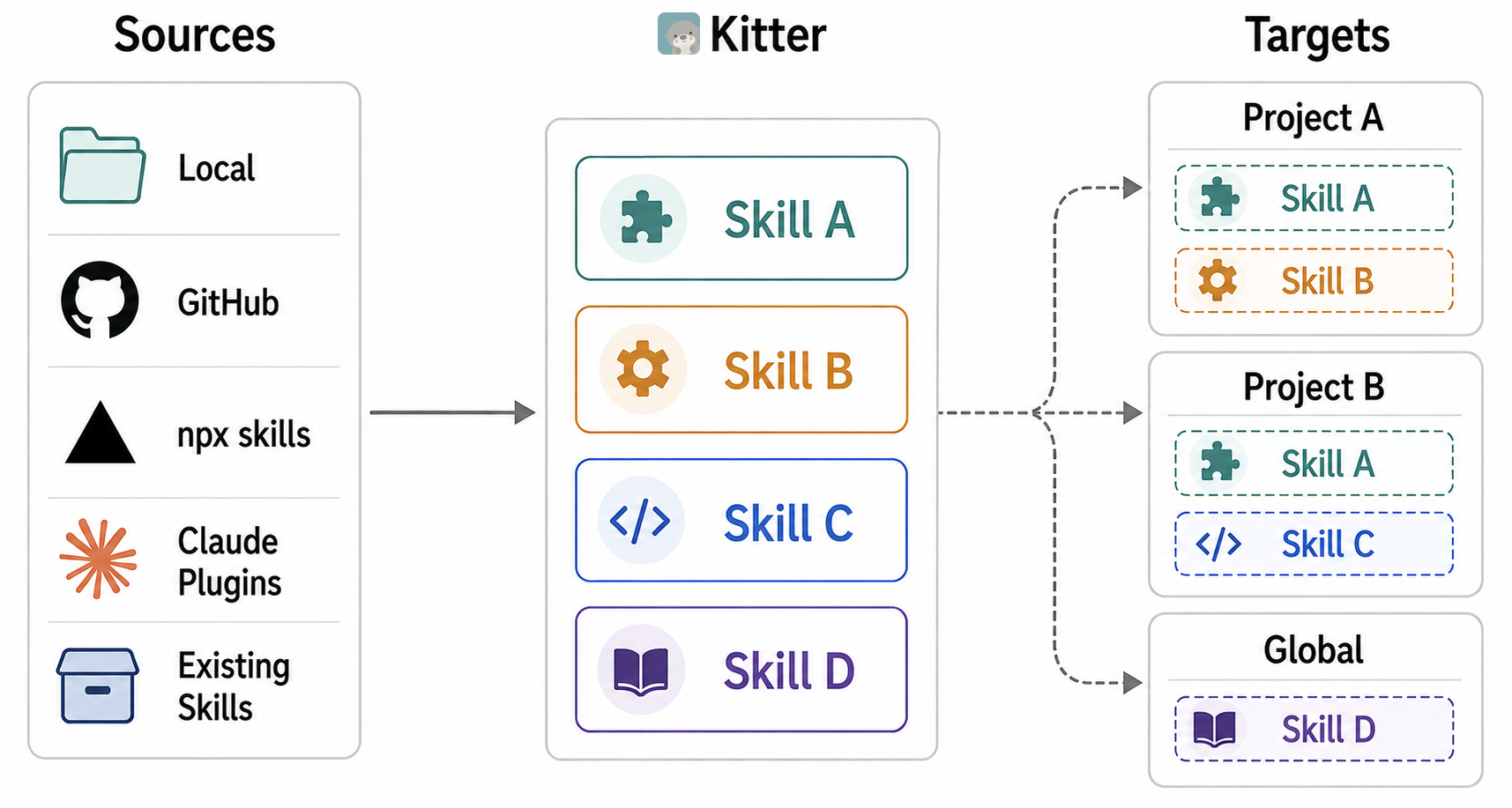
Kitter’s mental model is small enough to hold in your head, which is most of its appeal. There are three things: a library, installations, and projects.
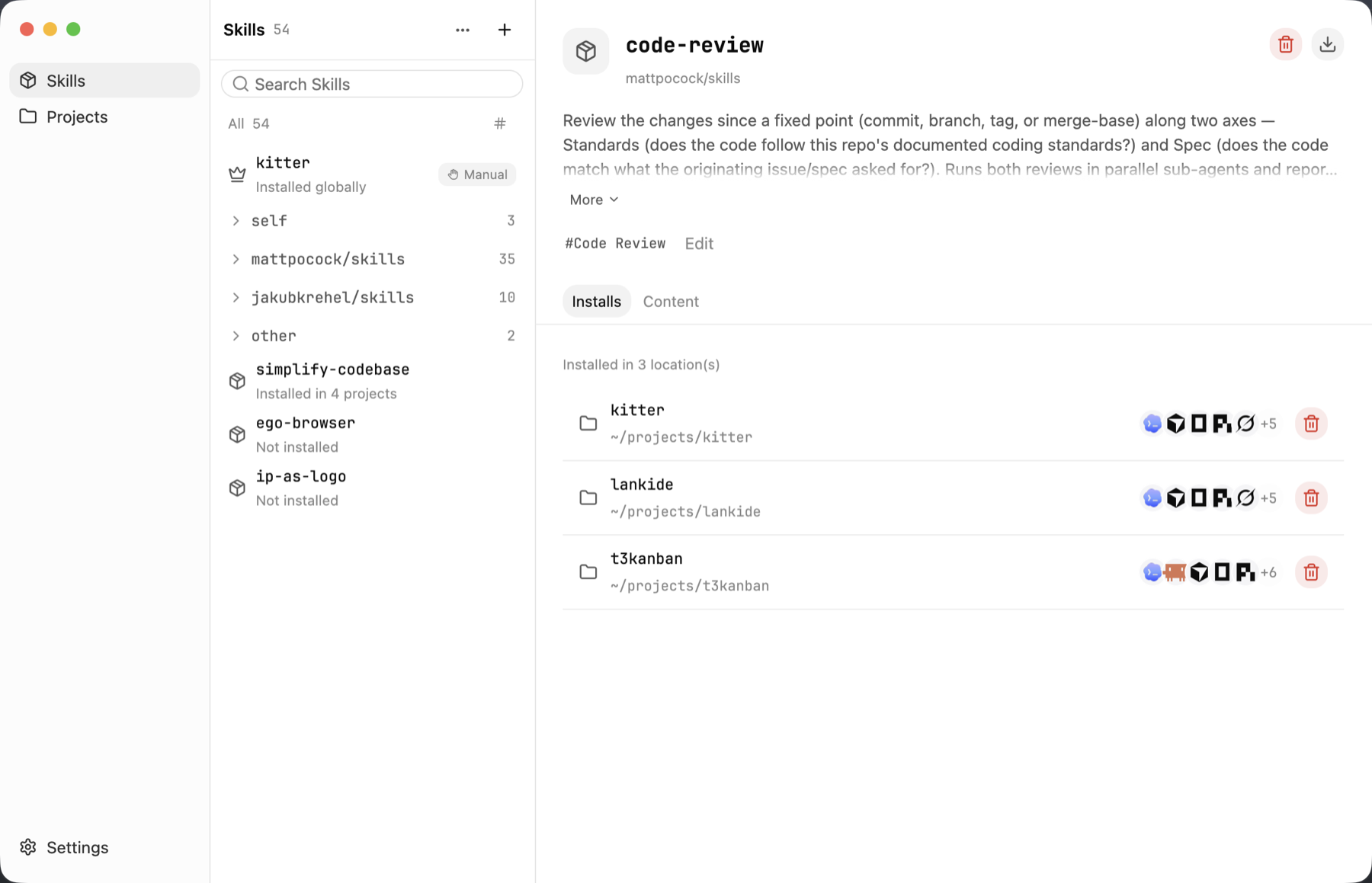
The library is the single maintained source for each skill. You add skills from a local folder, from GitHub, from a skills.sh-compatible source, or from a Claude plugin source; if skills are already scattered across projects, Existing installations inspects and adopts them without moving the source directories. Each skill then has an Installs tab showing which projects use it, where each installation lives, and which agents can discover it.
Installations are where the design decision lives. When you install a skill into a project, Kitter creates a managed link rather than an independent copy — into the shared .agents/skills directory or an agent-specific directory. That is what makes “maintain once” true: update the source and every linked project picks it up. Skills you use everywhere can also be installed at the user level.
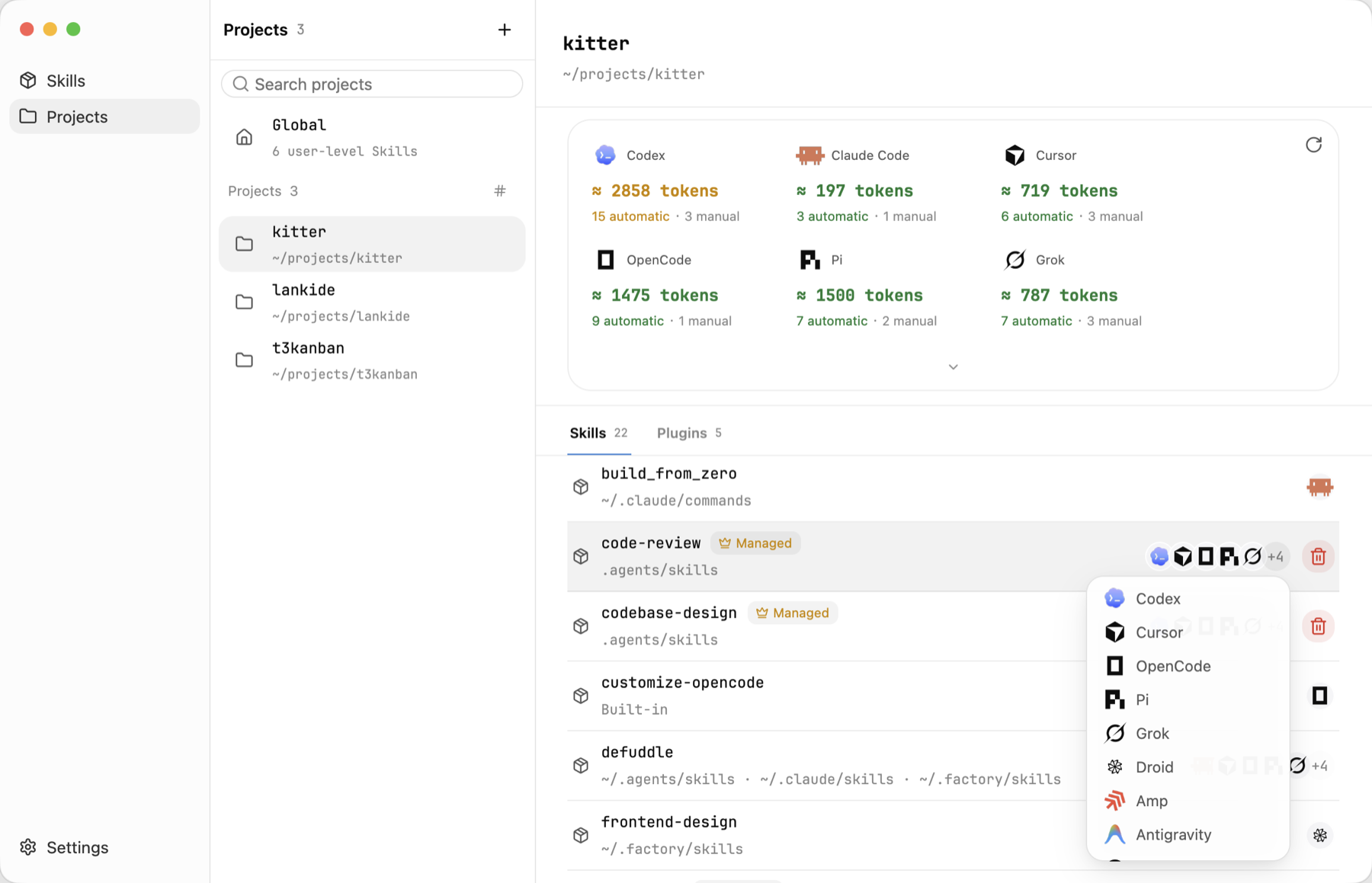
Projects are where visibility comes in. The Projects view shows the complete effective skill set for every agent — not just what Kitter manages, but project-level, parent, user-level, built-in and plugin-provided capabilities — with the source of each and a per-agent token estimate so you can spot skills adding context overhead you did not intend.
Using It
The desktop app is the headline: a builder button, a library list, an installation dialog per skill, a Projects view, and a Check for updates action. If you prefer the terminal, the CLI is intentionally minimal and mirrors the same objects:
kitter add npx https://github.com/owner/repository --skill skill-a
kitter install skill-a --project /path/to/project --target universal
kitter project /path/to/project
kitter update skill-a
There is also kitter check for bulk update checks and kitter library / kitter library --set /absolute/path to view or relocate the library. And because the project ships its own $kitter skill, an agent can be told to inspect the machine, adopt existing sources, install the right per-project combination and verify the result — falling back to guiding you through the standalone CLI download if it is missing.
Data lives where you would expect: skills in a per-platform library directory (~/Library/Application Support/Kitter/skills on macOS, %LOCALAPPDATA%\Kitter\skills on Windows, $XDG_DATA_HOME/Kitter/skills or ~/.local/share/Kitter/skills on Linux), with configuration and source records in the OS application-data directory.
The Platform Reality
Kitter ships desktop packages for macOS on both Apple Silicon and Intel, Windows x64, and Linux x64, plus separate standalone CLI artifacts for all three platforms built on the same core — a genuinely useful split, because a lot of developers will want the CLI without the GUI.
Two caveats come straight from the project’s own documentation. First, the macOS app is not signed with an Apple Developer ID, so macOS will block the first launch and you must clear it manually through Privacy & Security or by removing the quarantine attribute. Second, Linux desktop is the least proven of the three: the README says the Linux standalone CLI is ready while the desktop build still needs validation on real systems.
The Honest Limits
Everything above is why Kitter rates where it does; the items below are why it does not rate higher.
Three weeks old, and the bug list says so. The issue history is a tour of early cross-platform pain — a desktop shell PATH initialization fix, an npx skill scan that failed when Node was managed by mise, missing Cmd+Q on macOS until issue #15 asked for it, localization gaps, and a requested progress bar for repo downloads. None of these are fatal; all of them are the sound of a young app hardening in public. Confidence that the fixes landed, not that the surface is finished.
The token estimate is directional. The Projects view’s per-agent context figure is meant to help you find skills that cost more than they are worth. It is computed from the skill files, not measured against your agent’s real budget, so it is a spotlight rather than an invoice.
It manages skills, not all agent config. Open issue #7 asks for AGENTS.md management and a custom/plugin mechanism; neither is shipped. Plus, Kitter manages visibility and links, which means pointing it at sources you trust — the usual supply-chain caution for installing skills applies to the library it curates.
No hosted or team sync. The library is local. Standardising skills across a team still needs a distribution layer on top.
Bottom Line
Kitter is a small, sharp tool aimed at a problem that is only getting bigger. The managed-link model is the correct primitive, the Projects view answers a question no other tool answers cleanly, and building it in Rust with GPUI (rather than shipping another Electron shell) keeps it light. Against a three-week-old codebase, an unsigned macOS build, an unvalidated Linux desktop, an estimated token figure and no team sync, it earns 7.4/10 — an easy recommendation for the individual developer juggling several agents and projects who wants their skill setup to stop drifting, and a plausible one for teams once signing, Linux validation and a sync story arrive.