geiger Review 2026 — One Read-Only Command That Shows What Every AI Agent on Your Machine Can Touch
✅ Pros
- • The install is genuinely one command with no side effects: npx geiger-scan runs from Node 18 with zero dependencies, no global install, no account and no admin rights, and the only write it ever performs is a JSON file you explicitly name — which is exactly the property you want from the tool you run before you trust anything else on the machine
- • It answers a question almost nobody can currently answer: an inventory of every AI agent, MCP server, hook, plugin, skill, extension and CLI on a machine, grouped by ecosystem, each with a plain-language description of what it can reach — EXECUTES, HOLDS-SECRETS, BROAD-FILESYSTEM, BROAD-WEB, NETWORK — plus the evidence path so you can verify any line by hand
- • The baseline-diff workflow is the feature that turns a one-off scan into a practice: save a --json snapshot, then run geiger-scan --strict --diff baseline.json on a schedule so it exits non-zero only when something new can execute code or hold secrets, leaving the already-reviewed inventory quiet — the same accept-what-is-there, alarm-on-change logic as a lockfile
- • Secrets are handled by shape only: when a credential-shaped value is found in a config, geiger reports the key name, the file and what kind of secret it looks like, never any part of the value, with a redaction pass over all output and a test suite that enforces the redaction — so the inventory tool does not become the leak
- • It reads the ecosystems people actually have installed, not a token subset: Claude Code (global and per-project MCP servers, hooks, plugins, skills, subagents, apiKeyHelper), the MCP hosts (Claude Desktop, Cursor, Windsurf, VS Code, Cline, Roo Code, Continue, Zed), and a long tail of other agents from Codex CLI and Gemini CLI to Aider, OpenCode, Copilot CLI, Goose, Junie, Ollama and LM Studio, plus AI extensions in Chromium and Firefox profiles and their granted permissions
- • It recognises policy wrappers — agents that put an enforcement layer in front of an MCP server — and reports both layers rather than hiding the real server behind the wrapper, which is precisely the configuration where a naive inventory would give a false sense of safety
- • The HTML report ships per-finding 'what to do' remediation blocks and the terminal output carries fix: lines, so a finding arrives with a next step rather than a raw file path; a sample report and sample JSON are committed to the repository so you can see the output shape before running anything
⚠️ Cons
- • It reads known configuration locations, and the README says so up front: agents installed in nonstandard paths, other user accounts, containers, or WSL seen from the Windows side are not detected. A clean scan means 'nothing in the standard places', not 'nothing on this machine'
- • It reports configuration, not runtime behaviour — it can tell you a plugin sits in a position that allows execution and holds credentials, but not what it did with them. For anything actually malicious you still need process, network and file telemetry that this tool deliberately does not collect
- • Origin is not trustworthiness, and geiger is careful to say it cannot judge whether a package is malicious — only where it came from (registry, store, git, local script, remote server, or UNKNOWN-ORIGIN). The most useful single label in the output, UNKNOWN-ORIGIN, is also the one that gives you no resolution
- • Coverage is a permanent chase: the tool's own README notes the ecosystem it audits changes weekly, so detectors are deliberately small and data-driven. The formats that are only partially parseable, notably TOML configs, are shape-scanned and flagged with reduced confidence rather than skipped — better than a false negative, but still a hole you have to know about
- • It is very young and very small: created September 6, 2026, four releases in three days (v0.1.0 to v0.2.1), two forks and one watcher at review time. The engineering is tidy and CI-backed, but there is no community, no third-party detector ecosystem, and no track record beyond the author's own machines
Anyone who has installed more than one AI coding agent — a Claude Code plus a Cursor plus a Codex CLI plus a couple of AI browser extensions — and cannot currently answer the question 'what is running on this machine and what can it reach?' It is also a natural fit for small IT and MSP teams who want a lockfile-style drift alarm across a fleet of developer machines, run per-machine on a schedule and diffed against a saved baseline.
Free and open source (MIT). Run npx geiger-scan for the terminal report, add --html report.html for a self-contained report with remediation guidance, or --json out.json for machine-readable findings (schemaVersion 1). Node 18 or newer is the only prerequisite; there is no global install, no account, no telemetry endpoint and nothing to pay. The unreleased main branch can be run with npx github:Atomburstofficial/geiger. It ships as the npm package geiger-scan.
The Pitch: Most People Cannot Say What Is Running on Their Own Machine
geiger, released September 6, 2026 under MIT, opens with a paragraph that reads less like marketing than a diagnosis. In August 2026, an open-source agent harness went from zero to more than 200,000 GitHub stars in three weeks; its plugin ecosystem passed 13,000 repositories in the same window; one-click desktop clients appeared the day it launched; and Instagram carousels began teaching office workers to install all of it. Every one of those installs is a program that can execute commands, read files and hold credentials, configured in dotfiles nobody opens twice. “What is actually running on this machine, and what can it reach?” the README asks. “Most people cannot answer it. Now it’s one command.”
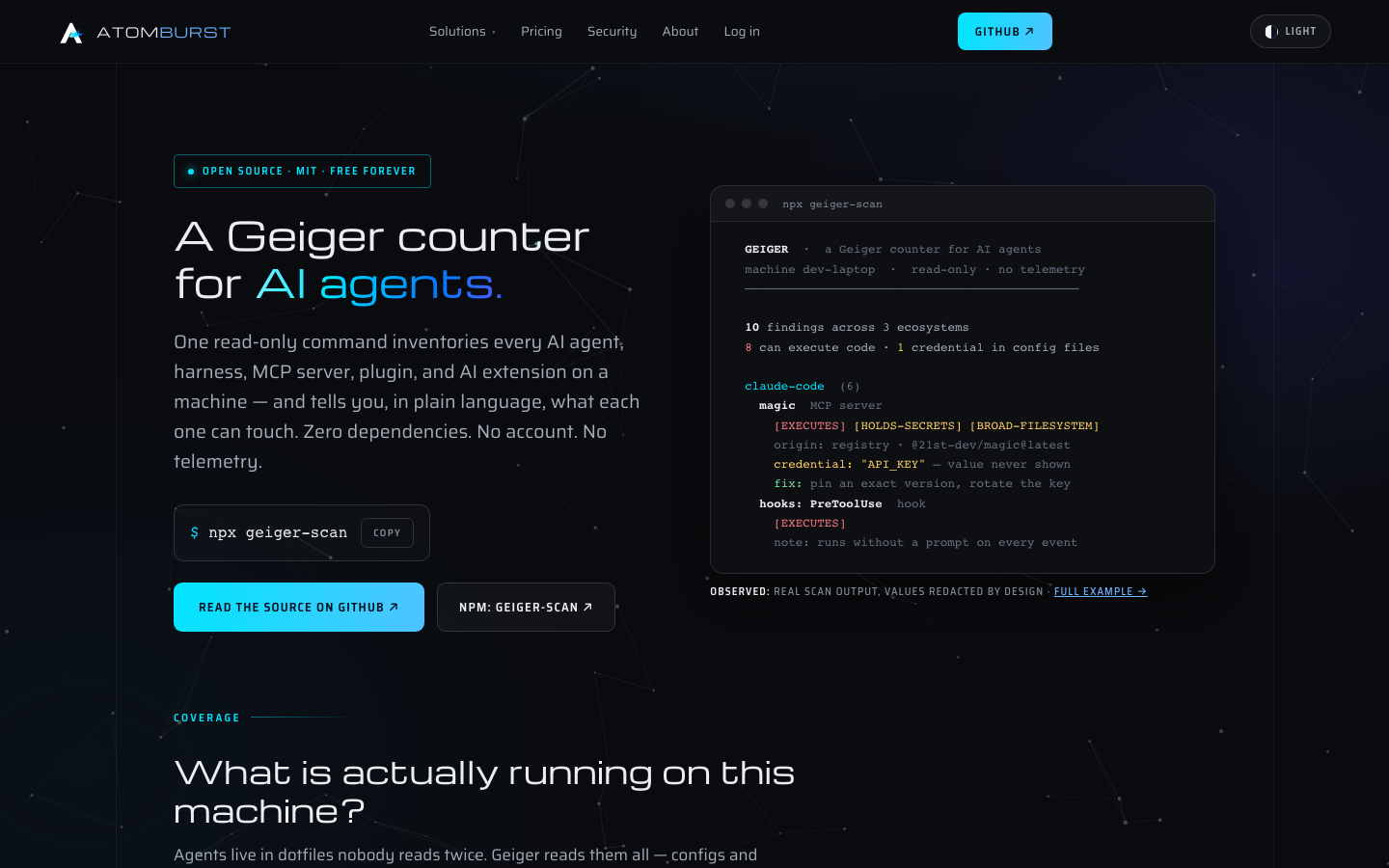
The command is npx geiger-scan, and the tool is a read-only inventory — the authors call it a Geiger counter for AI agents — that scans a machine for AI agents, harnesses, MCP servers, plugins and extensions, then labels each one in plain language with what it can touch. It is not a security audit and says so; it is the inventory you need before an audit means anything.
One Command, Nothing Installed, Nothing Written
The ergonomics are the first argument for it. Node 18 or newer is the only prerequisite; geiger has zero dependencies, so npx geiger-scan pulls down a single self-contained tool, runs, prints a report and exits. There is no global install, no account, no admin rights, and — the part that matters most for a tool whose job is trust — no write of any kind except a JSON file you explicitly name with --json yourfile.json. It never executes npm while scanning, and it never phones home. That combination is what makes it reasonable to run before you trust the other agents on the box.
What It Detects, and What Each Finding Looks Like
The coverage list is broad by any measure. On the Claude Code side it reads global and per-project MCP servers, hooks, plugins, skills, subagents and apiKeyHelper. Across MCP hosts it covers Claude Desktop, Cursor, Windsurf, VS Code (user and project), Cline, Roo Code, Continue and Zed. In the wider agent long tail it reads Codex CLI, Gemini CLI, Kilo CLI, Grok Build, Aider, OpenCode, Qwen Code, DeepSeek Harness, GitHub Copilot CLI, Goose, JetBrains Junie, Open Interpreter, LM Studio and Ollama. It also inventories AI extensions inside VS Code, Insiders and Cursor, AI extensions in Chrome, Edge, Brave and Firefox profiles with their granted permissions, JetBrains AI Assistant / MCP settings presence, and agent packages in global npm roots (read directly, never by running npm).
The output is the interesting part. Findings are grouped by ecosystem, and each one gets four things: what it is, where it came from, what it can do, and where the evidence lives. The capability labels are deliberately plain — EXECUTES, HOLDS-SECRETS, BROAD-FILESYSTEM, BROAD-WEB, NETWORK — and the origin labels are registry, store, git, local script, remote server, or the notably honest UNKNOWN-ORIGIN. A finding for an MCP server that sits behind an enforcement agent is reported with both layers, so a policy wrapper does not launder the server underneath it.
Three Promises, and Why They Matter Here
The project reduces its own trust story to three promises, and each is the kind of claim that is easy to make and unusually easy to check. First, read-only: the only write geiger performs is the --json file you name. Second, no telemetry: nothing leaves the machine, and the authors note there is no endpoint to send anything to — a trade they say they are happy with because it also means they cannot know how many people use it. Third, secrets by shape only: when a credential-shaped value turns up in a config, geiger reports the key name, the file and what kind of secret it resembles, never any part of the value, with a redaction pass over all output and a test suite that enforces it. A scanner that leaks secrets while hunting for exposures would be worse than no scanner; that the test suite pins the redaction behaviour is the right engineering response.
The Feature That Turns a Scan Into a Practice
A one-off scan is a snapshot. geiger’s answer is the baseline diff. Run once, save a baseline with --json baseline.json, then put geiger-scan --strict --diff baseline.json on a schedule — cron, CI, a login script, an RMM task. The scan compares the fresh machine against the snapshot and reports what appeared, disappeared or escalated (a server gaining a credential is reported as CHANGED, not as a remove plus an add). With --strict it exits 2 only when something new can execute code or hold secrets; the already-reviewed inventory stays quiet. The README frames it exactly right: the same mental model as a lockfile — accept what is there, alarm on change. For a small IT team, the documented fleet pattern — per-machine --json files on a share, each with its own baseline — is a credible way to monitor developer machines without deploying an agent of its own.
Honest Limits, Stated Before You Find Them
The limitations section is the strongest signal of the project’s character. Geiger reads known config locations: agents in nonstandard paths, other user accounts, containers, or WSL as seen from Windows are not found, so a clean scan means “nothing in the standard places”, not “nothing here”. It reads configuration, not runtime behaviour: it can say a plugin is positioned to execute and to hold credentials, never what it actually did with them. It cannot judge whether a package is malicious — only where it came from and what it can reach, and origin is not trustworthiness. Partially parseable formats, notably TOML, are shape-scanned and flagged with reduced confidence rather than skipped. And the ecosystem it audits changes weekly, so the detectors are deliberately small and data-driven — which means coverage is a permanent chase, not a milestone.
Taken together, those caveats do not undercut the tool; they define its job. geiger is the first pass: narrow the space from “an unknown number of programs with filesystem and credential access” to “these specific findings, each with a path you can open”. Everything expensive and rigorous happens after that.
Who Should Care
The audience is anyone running more than one coding agent or a handful of AI extensions and feeling the drift. The scan is fast, the labels are readable, the report carries fixes, and the diff mode makes it a habit rather than a curiosity. It is a poor fit if what you actually want is runtime detection or an audit — the README would tell you the same. At 7.6/10 it is a clear Silver-plus: a narrow tool that does one honest thing extremely well, priced at free, installable in seconds, and documented with the kind of limitations section that makes the parts it does claim more believable. The deduction is for youth, for a small ecosystem, and for the inherent ceiling of any configuration-only scanner — real, and clearly acknowledged.