Birdview Review 2026 — Map a Codebase's Architecture Before Letting an AI Agent Edit It
✅ Pros
- • It attacks the right failure mode of AI coding: an agent edits a file with no model of the system around it, and Birdview forces an architecture check first — establish or update an evidence-backed map, declare which modules are in scope, then edit with that context in view
- • The output is a genuinely self-contained artifact: a single interactive HTML file with architecture, changes and side-by-side comparison views on the same layout, light and dark themes, relationship filtering and module inspection, requiring no server and no network at runtime, which makes it reviewable and attachable like a document
- • Stable module IDs plus file ownership plus an explicit evidence field are what separate it from a box-and-arrow diagram: the map is meant to be validated and reused across revisions, so a module has an identity that persists and a responsibility it owns rather than a shape someone drew once
- • The validation layer is real: two JSON Schemas (architecture and activity) plus a validator that checks cross-record rules — stable map identity, contiguous sequences, valid scope and targets, file ownership, consistent check results — so a malformed map or a fabricated activity record fails before it renders
- • The activation model is flexible and non-destructive: Birdview defaults to auto mode (every code-changing task inspects the map and declares affected modules first) but pins per-project on-demand settings, and the CLI manages only its own block inside AGENTS.md rather than rewriting the file
- • The project is unusually explicit about its own boundaries for a v0.1 — it states that a completed event does not prove checks passed, that only recorded check results make that claim, and that validation does not prove architecture claims are true or that referenced source files exist
⚠️ Cons
- • It is genuinely v0.1 and the version number is not marketing: released at 0.1.1, the package is still marked private and is not published to npm, which means there is no npx-style one-liner install and you are working from a source checkout
- • Birdview does not watch your editor: activity is declared by an agent, not observed, so the 'changes' view shows what the agent says it is doing rather than what it did. Updates require regenerating the HTML and refreshing the browser — there is no live transport, no auto-refresh and no rendered-display acknowledgement
- • The whole value depends on discipline the tool cannot enforce: the README is careful to call Birdview 'agent guidance, not a write interceptor', so a model that ignores the skill simply edits blind while producing a tidy map that no longer matches reality
- • Adoption cost is real for a young tool: you must author an architecture.json that follows the schema, keep it current, and optionally maintain an activity.jsonl of declared events, on Node.js 18+, with the viewer's browser-level tests needing a local Playwright install or a BIRDVIEW_PLAYWRIGHT_PATH override
- • There is essentially no community yet: zero issues at review time, no release history beyond the 0.1.1 notes, and the live demo is explicitly a simulation built from fictional example records — so every example you can look at is the project demonstrating itself, not a real team's map
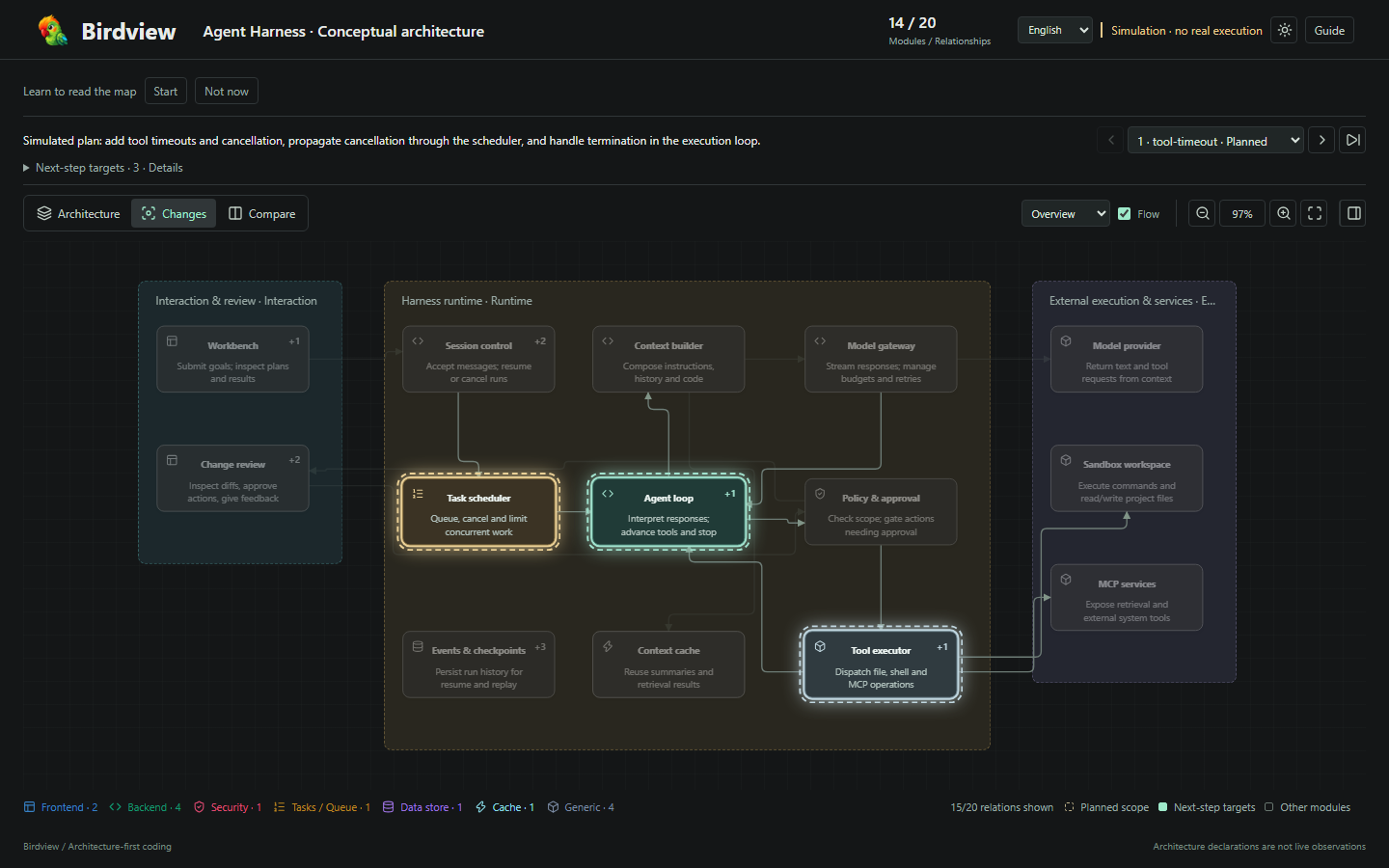
- • The demo honesty cuts both ways: the screenshot and live demo use a fictional agent harness, and the project says so plainly, but that also means reviewers cannot yet see how the views hold up on a genuinely large, messy codebase with hundreds of modules
Engineers and tech leads who use coding agents (Claude Code, Codex and similar) on a codebase where blind edits are expensive — who want a reviewable, self-contained architecture view that exposes which responsibilities and files a change touches, and who are willing to author and maintain a map to get it, rather than expecting the tool to infer the architecture automatically
Free and open source (MIT, copyright 2026 Qiuner). Birdview requires Node.js 18 or newer and is used from a source checkout (npm ci, npm run validate:examples, npm test, npm run build:demo). Validate and render from the CLI: node scripts/validate.mjs .birdview/architecture.json then node scripts/render.mjs .birdview/architecture.json .birdview/architecture.html (add a second file to include a declared activity.jsonl history). Activation is managed per project with node scripts/birdview.mjs mode auto|on-demand --project <project-root>.
What Birdview Is
The most expensive AI-coding mistake is not a wrong line of code. It is a correct-looking edit to the wrong place — a change that compiles, passes a surface test, and quietly breaks a responsibility the model never knew existed because it only ever looked at the file in front of it. Diffs explain which lines changed; logs explain what happened over time. Neither shows the system the change sits inside. Birdview, created September 12, 2026 by Qiuner, is a small MIT project that inserts that missing context before the edit instead of after the incident.
It is two things at once: an Agent Skill that changes the default coding flow — map the architecture first, expose the modules an agent plans to touch, then edit with evidence in view — and a standalone renderer that turns architecture descriptions plus agent-declared activity into a single self-contained interactive HTML file. At review time it sits at 251 stars and 12 forks and version 0.1.1, released under the MIT license.
The Two-Stage Workflow
Birdview’s recommended flow is deliberately two ordered stages, and the ordering is the idea.
Stage 1 — map the project. Inspect the project, establish or update an evidence-backed architecture map, validate it, and review the rendered HTML. Stage 2 — show the changes. For a concrete coding task, declare the planned scope, current targets, files, lifecycle phase, and real check results against that same map revision.
That second detail — “against that same map revision” — is what makes the map more than a diagram. The architecture file defines modules, responsibilities, ownership, evidence, relationships, groups and layout, with stable module IDs. The optional JSONL stream binds ordered task events to a specific project, a specific map revision, and a set of module IDs. If the map changes, the activity that was declared against the old revision does not silently apply to the new one.
The data contracts are documented and small. architecture.json carries the project identity, modules, ownership, evidence, relationships, groups and stable layout. activity.jsonl carries the ordered, agent-declared task scope, targets, files, phases and verification records. architecture.html is the generated standalone viewer containing the validated map and optional history.
The Validation Layer
Plenty of tools draw architecture diagrams; far fewer give the diagram a contract. Birdview ships two JSON Schemas and a validator (scripts/validate.mjs) that goes beyond schema-shape checking into cross-record rules: stable map identity, contiguous sequences, valid scope and targets, file ownership, and consistent check results. The renderer validates both inputs before it produces a view, so a malformed architecture or a fabricated activity record fails at the gate.
That cross-checking is the quiet substance of the project. File ownership means the map can catch a module claiming a file another module already owns. Consistent check results means a completed event cannot quietly coexist with a failed check. The semantics live in a contract document (references/contract.md), and the project keeps bilingual authoring rules for documentation changes.
The rendering pipeline is a straight line: project source becomes architecture.json, agent declarations become activity.jsonl, both are validated, and the renderer emits standalone HTML. The output has no server and no network dependency, so a map is something you can attach to a review, commit, or hand to a teammate who just opens a file.
Using It
The CLI is where you will live:
npm ci
npm run validate:examples
npm test
npm run build:demo

node scripts/validate.mjs .birdview/architecture.json
node scripts/render.mjs .birdview/architecture.json .birdview/architecture.html
Add a second input to fold in a declared activity history, and use --bilingual on the validator if you need Chinese and English authoring, or --simulation on the renderer for fictional records only.
Activation is per project and has two modes. Auto is the default: every code-changing task first inspects and reuses or updates the architecture map, renders it, and declares affected modules before editing. On-demand leaves it to an explicit request. You switch with the CLI, and — this is a good sign of restraint — the command manages only its own block inside the project’s AGENTS.md rather than rewriting the file. The project is also careful to note that saying “use Birdview this time” does not persist a setting.
The viewer itself ships a Guide walkthrough in the toolbar — a spotlight tour across architecture, current changes, comparison, module evidence and activity history — with light and dark themes, relationship filtering, module inspection, Chinese/English UI controls, and dismissal remembered in browser storage so the first-visit invitation does not nag.
The Honest Limits
The README’s boundary section is the most credible part of the project, and it is also the list of reasons the rating is a 7.2 rather than higher.
v0.1.1 is literal. The npm package is still marked private and unpublished, so there is no npx install; you run it from a source checkout, and the viewer’s browser-level tests need a local Playwright or a BIRDVIEW_PLAYWRIGHT_PATH override.
It does not observe your editor. Activity is declared by an agent, not automatically captured. Updates require regenerating the HTML and refreshing the browser; live transport, automatic refresh and rendered-display acknowledgements are explicitly not implemented. The project says flatly that a completed event does not prove checks passed — only recorded check results make that claim.
It cannot enforce anything. Birdview describes itself as “agent guidance, not a write interceptor.” A model that ignores the skill edits blind, and the map it kept becomes fiction. The tool makes the discipline visible and cheap; it does not guarantee the discipline.
There is almost no community. Zero issues at review time, one release (0.1.1), and a live demo explicitly built from fictional example records. That honesty is admirable, and it also means nobody has yet shown how the views hold up on a genuinely large, messy codebase.
Bottom Line
Birdview is a small, well-argued answer to a specific question: what does the agent think it is changing, and what does the system say that touches? Stable module IDs, a real evidence field, file-ownership checks and a self-contained HTML viewer are the right primitives, and the project’s willingness to state exactly what it does not do — observe, live-update, enforce, or prove — is rare at version 0.1.1. Set against an unpublished private package, a declared-not-observed activity model, zero community and real authoring cost, it earns 7.2/10: worth adopting today if you already care about architecture as code and run coding agents on a codebase where blind edits hurt, and worth watching closely if you do not — because the idea is stronger than the release that currently carries it.