Napkin vs Mermaid vs Diagrams.ai vs Eraser 2026: Best AI Diagramming Tools
Introduction
Diagrams are the universal language of ideas — but creating them has traditionally been tedious work, dragging boxes and arrows around a canvas. AI is changing that. In 2026, four tools are redefining how we create diagrams: Napkin (AI that draws from text), Mermaid (code-first diagramming with AI assistance), Diagrams.ai (prompt-to-diagram generation), and Eraser (the “diagram as code” platform for engineering teams).
Each tool approaches diagramming from a different angle. Napkin produces beautiful, presentation-ready visuals. Mermaid favors precision and version control through code. Diagrams.ai prioritizes speed and accessibility through natural language. Eraser combines diagramming with technical documentation for development workflows. This comparison evaluates each on diagram quality, supported diagram types, AI capabilities, collaboration features, and integration into real-world workflows.
Feature Comparison
| Feature | Napkin | Mermaid | Diagrams.ai | Eraser |
|---|---|---|---|---|
| AI Text-to-Diagram | ✅ Core feature (paste text, get diagram) | ✅ GitHub Copilot / AI assists | ✅ Prompt-to-diagram generation | ✅ AI diagram from description |
| Diagram Types | Flowcharts, mind maps, infographics, process maps | 30+ types including sequence, class, ER, Gantt | Flowcharts, org charts, network diagrams, swimlanes | Architecture diagrams, ERDs, sequence diagrams, flowcharts |
| Visual Style | ⭐⭐⭐⭐⭐ (beautiful, polished) | ⭐⭐⭐ (functional, technical) | ⭐⭐⭐⭐ (clean, modern) | ⭐⭐⭐⭐ (clean, engineering-focused) |
| Text/Code Editor | ❌ (GUI only) | ✅ Markdown-like syntax | ❌ (GUI only) | ✅ Diagram-as-code + GUI |
| Version Control | ❌ | ✅ Git-friendly (text files) | ❌ | ✅ Git-friendly |
| Customization | ⭐⭐⭐⭐⭐ (themes, fonts, colors) | ⭐⭐⭐ (themes via config) | ⭐⭐⭐⭐ (style presets + manual) | ⭐⭐⭐ (icon sets, themes) |
| Collaboration | ✅ Shared diagrams, comments | ✅ Via GitHub/PRs | ✅ Real-time multi-user | ✅ Real-time multi-user |
| Export Formats | PNG, SVG, PDF | SVG, PNG, PDF (via renderers) | PNG, SVG, PDF | PNG, SVG, PDF, Markdown |
| Integrations | Notion, Google Slides, PowerPoint | All markdown platforms, GitHub, VS Code | Google Slides, PowerPoint | GitHub, VS Code, Confluence, Notion |
| Embedding | ✅ Responsive embeds | ✅ Native in Markdown | ✅ Embed links | ✅ Embed + iFrame |
| Offline Usage | ❌ (cloud-only) | ✅ Local rendering | ❌ (cloud-only) | ❌ (cloud-first) |
Pricing Comparison
| Plan | Napkin | Mermaid | Diagrams.ai | Eraser |
|---|---|---|---|---|
| Free | 5 diagrams/mo, watermark | Completely free (open-source) | 3 diagrams/mo, watermark | 5 diagrams/mo, basic features |
| Pro / Individual | $12/mo (unlimited diagrams) | Free (self-hosted) / Mermaid Live: $8/mo | $10/mo (unlimited diagrams) | $10/mo (unlimited diagrams, advanced AI) |
| Team / Business | $20/seat/mo | Mermaid Chart Enterprise: $15/seat/mo | $20/seat/mo | $20/seat/mo |
| Enterprise | Custom | Custom (on-prem available) | Custom | Custom |
Detailed Analysis
Napkin — Best for Beautiful, Presentation-Ready Diagrams
Napkin approaches diagramming differently from every other tool. Instead of starting with shapes and connectors, you paste text — a paragraph, bullet points, an outline — and Napkin’s AI generates multiple diagram options from your content. You don’t draw the diagram; you select the best AI-generated option and refine.
The visual quality is Napkin’s strongest differentiator. Generated diagrams are genuinely beautiful, with thoughtful color palettes, spacing, typography, and icon usage. These aren’t utilitarian engineering diagrams — they’re presentation-ready visuals suitable for pitch decks, blog posts, client deliverables, and executive summaries.
Smart formatting automatically adjusts layouts as you edit text — add a bullet point, and the diagram reorganizes itself. Change the color theme, and it applies consistently across all elements. Napkin’s template library includes dozens of style presets optimized for different contexts (investor decks, internal docs, marketing content, educational material).
Integration with presentation tools is a key strength: export directly to Google Slides and PowerPoint with editable elements. Embed responsive Napkin diagrams in Notion pages that update when the source text changes.
Napkin’s limitations: it’s cloud-only, so no offline work. The free tier’s 5-diagram limit is restrictive. And it’s not designed for technical diagrams like ERDs, UML, or network architecture — Napkin is a visual communication tool, not an engineering documentation tool.
Who it’s best for: Consultants, marketers, product managers, and anyone who needs to communicate ideas visually to non-technical audiences with minimal effort.
Mermaid — Best for Code-First, Git-Friendly Diagramming
Mermaid takes the opposite approach to Napkin: instead of a GUI, you write diagrams as text using a simple markdown-like syntax. A flowchart looks like graph TD; A[Start] --> B[Process]; B --> C[End]. This code-first philosophy has made Mermaid the default diagramming tool for developers and technical writers.
The Git-friendly nature is Mermaid’s killer advantage. Diagrams are plain text — they diff cleanly in pull requests, track changes over time, and merge without conflicts. For engineering teams that treat documentation as code, Mermaid is the obvious choice.
Mermaid’s 30+ diagram types cover virtually every technical diagramming need: flowcharts, sequence diagrams, class diagrams, state diagrams, entity relationship diagrams, Gantt charts, Git graphs, C4 architecture diagrams, mind maps, timelines, and more. No other tool in this comparison offers this breadth of diagram types.
Native Markdown support means Mermaid renders automatically in GitHub, GitLab, Notion, Obsidian, and most markdown-based platforms. Write a diagram in your README, and it renders natively. No export, no embedding, no broken image links.
The AI integration comes primarily through coding assistants: GitHub Copilot, Cursor, and other AI code editors can generate and edit Mermaid diagrams from natural language descriptions. Mermaid Chart (the hosted service) also offers AI-assisted editing.
The trade-off: Mermaid diagrams look functional, not beautiful. They’re optimized for clarity and precision, not visual appeal. Complex diagrams with custom styling require understanding Mermaid’s configuration syntax. And the code-first approach is a barrier for non-technical users who just want to draw boxes and arrows.
Who it’s best for: Developers, DevOps engineers, technical writers, and any team that treats documentation as code and values version control for diagrams.
Diagrams.ai — Best for Speed and Natural Language Generation
Diagrams.ai entered the market with a deceptively simple premise: describe a diagram in natural language, and AI generates it. “Create a flowchart showing user registration with email verification, password reset, and OAuth login options” — and Diagrams.ai produces it in seconds.
The prompt-to-diagram speed is the fastest in this comparison. While Napkin requires pasting structured text and Mermaid requires typing code, Diagrams.ai works from casual descriptions. This makes it ideal for brainstorming and rapid iteration — describe five variations of a process and pick the best one in under a minute.
Smart auto-layout handles complex arrangements surprisingly well. Network diagrams with 20+ nodes, org charts with multiple hierarchy levels, and swimlane diagrams with cross-functional flows all benefit from AI-driven positioning that usually gets it right on the first attempt.
Diagrams.ai supports the most common business diagram types: flowcharts, org charts, network diagrams, process flows, swimlanes, and mind maps. It doesn’t offer the technical depth of Mermaid (no class diagrams, no Gantt charts, no sequence diagrams), and it doesn’t match Napkin’s visual polish. It occupies a middle ground: faster than Napkin for text-to-diagram, more accessible than Mermaid, but not the best at anything specific.
The limitations: 3 free diagrams per month is the most restrictive free tier. No version control integration. No code-based editing. Export quality is good but not as polished as Napkin’s outputs. And the AI occasionally generates structurally correct but semantically wrong diagrams that require manual correction.
Who it’s best for: Business analysts, project managers, and anyone who wants to go from idea to diagram in under 30 seconds without learning any tool.
Eraser — Best for Engineering Teams and Diagram-as-Code
Eraser sits at the intersection of diagramming and technical documentation. It’s built for engineering teams that need to create architecture diagrams, ERDs, sequence diagrams, and flowcharts alongside API documentation, RFCs, and design docs — all in a single collaborative canvas.
Diagram-as-code is Eraser’s defining approach: diagrams are defined in a text syntax (custom but Mermaid-inspired), rendered visually, and version-controlled alongside documentation. Change the text, and the diagram updates. Copy-paste a diagram definition into another doc, and it renders identically. This consistency across documents is valuable for teams maintaining large documentation sets.
Eraser’s AI diagram generation has improved significantly in 2026. Describe an architecture — “A three-tier web app with React frontend, Node.js API on ECS, RDS PostgreSQL with read replicas, and CloudFront CDN” — and Eraser generates both the architecture diagram and accompanying documentation.
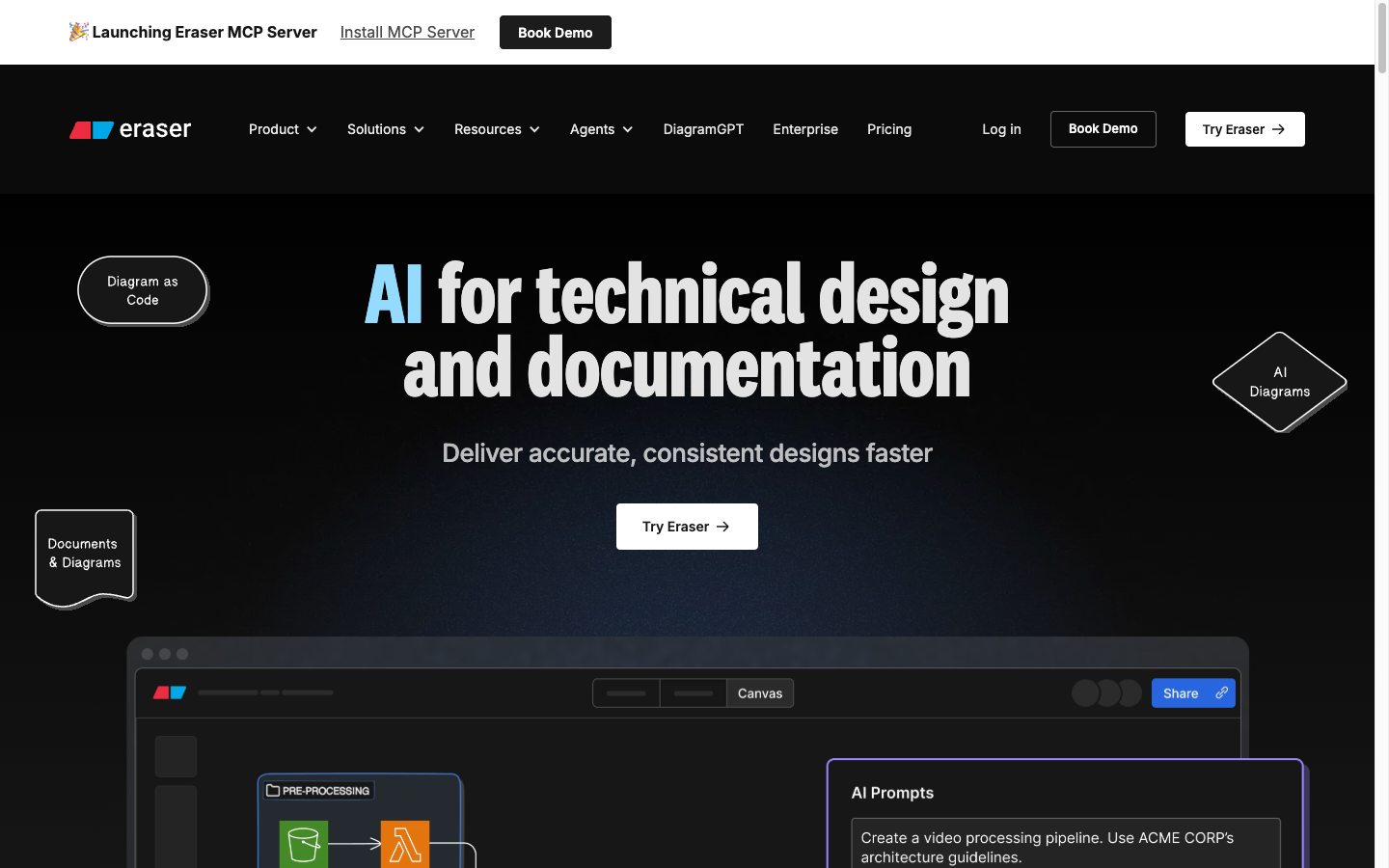
The diagram + document integration is Eraser’s unique strength. Diagrams live inside documentation pages, not as separate files. You can reference diagram elements from the surrounding text, and AI can generate both the diagram and the explanatory documentation from a single prompt. For engineering teams, this dramatically reduces the friction between designing and documenting.
Eraser’s limitations: it’s purpose-built for engineering workflows and feels unnatural for business users. The visual style is clean but utilitarian — not suitable for marketing or executive presentations. Customization options are limited compared to Napkin. And while diagram-as-code is powerful, it requires learning Eraser’s syntax, which adds upfront friction.
Who it’s best for: Engineering teams that need architecture diagrams integrated with technical documentation, teams practicing design-doc-driven development, and anyone who values diagram consistency across a large knowledge base.
Real-World Performance
We tested each tool on three common diagramming scenarios: a business process flowchart, a software architecture diagram, and a presentation-ready visual for an investor pitch:
| Test Scenario | Napkin | Mermaid | Diagrams.ai | Eraser |
|---|---|---|---|---|
| Business process flowchart (10 steps) | ⭐⭐⭐⭐⭐ (2 min, beautiful) | ⭐⭐⭐ (5 min, functional) | ⭐⭐⭐⭐ (30 sec, good) | ⭐⭐⭐ (8 min, precise) |
| AWS architecture diagram | ⭐⭐ (not designed for this) | ⭐⭐⭐⭐ (C4/arch diagrams) | ⭐⭐⭐ (basic cloud icons) | ⭐⭐⭐⭐⭐ (purpose-built) |
| Investor pitch visual | ⭐⭐⭐⭐⭐ (presentation-ready) | ⭐ (not suitable) | ⭐⭐⭐ (adequate) | ⭐⭐ (too technical) |
| Version control & diff review | ⭐ | ⭐⭐⭐⭐⭐ (plain text diff) | ⭐ | ⭐⭐⭐⭐⭐ (diagram-as-code) |
| Learning curve (1=easy) | ⭐⭐⭐⭐ (intuitive UI) | ⭐⭐ (syntax learning) | ⭐⭐⭐⭐⭐ (natural language) | ⭐⭐⭐ (syntax + UI) |
| Multi-diagram consistency | ⭐⭐⭐⭐ (themes) | ⭐⭐⭐⭐⭐ (config + text) | ⭐⭐⭐ (per-diagram) | ⭐⭐⭐⭐ (reusable styles) |
Which Should You Choose?
Choose Napkin if:
- Visual quality and polish matter more than technical precision
- You create diagrams for presentations, marketing, or client deliverables
- You want AI to do the design work — paste text, pick a design, refine
- You frequently export to Google Slides or PowerPoint
Choose Mermaid if:
- You’re a developer or technical writer who thinks in code
- Git-friendly version control for diagrams is important
- You need the widest range of diagram types (30+)
- Your diagrams live in Markdown files (READMEs, wikis, docs)
Choose Diagrams.ai if:
- Speed is your top priority — go from idea to diagram in under 30 seconds
- You prefer natural language prompts over any other input method
- You create common business diagrams (flowcharts, org charts, process flows)
- You don’t need version control or deep customization
Choose Eraser if:
- You’re an engineering team creating architecture diagrams alongside documentation
- Diagram-as-code with version control matters
- You want diagrams and documentation generated from the same AI prompt
- You maintain large technical documentation sets with many interconnected diagrams
FAQ
Can I convert between these formats?
Partially. Mermaid code can be rendered in most tools that support Markdown. Eraser can import Mermaid syntax. Napkin and Diagrams.ai are GUI-only and don’t export to code formats. You can export any diagram as SVG/PNG and manually recreate it in another tool, but there’s no automated conversion between GUI-based and code-based diagramming tools.
Which tool is best for collaborative diagramming?
Napkin and Diagrams.ai offer the best real-time collaboration for non-technical teams. Eraser offers the best collaboration for engineering teams (with version control). Mermaid’s collaboration happens through Git workflows — pull requests with diagram diffs, which is powerful for developers but unfamiliar for non-technical users.
Can AI generate the right diagram from my description, or do I still need to manually adjust?
AI generation quality varies by diagram complexity. Simple flowcharts and org charts (5-15 nodes) are usually correct on first generation. Architecture diagrams with 20+ components require manual adjustment on all platforms. The AI is best used as a starting point, not a final output — expect to spend 2-10 minutes refining AI-generated diagrams, depending on complexity.
Do these tools work with accessibility requirements (screen readers)?
Mermaid is the best for accessibility because it renders from text that screen readers can parse. Napkin, Diagrams.ai, and Eraser export images that require alt text for accessibility. For applications where ADA/WCAG compliance matters, Mermaid or providing detailed text descriptions alongside GUI-generated diagrams is recommended.
Which tool works best embedded in Notion or Confluence?
Napkin has the best Notion integration (responsive embeds). Eraser has the best Confluence integration (native app). Mermaid renders natively in Notion, GitHub, and GitLab without any integration. Diagrams.ai provides embed links for both platforms. If Notion is your primary workspace, Napkin or Mermaid; if Confluence, Eraser.
Final Verdict
| Category | Winner | Runner-Up |
|---|---|---|
| Best Visual Quality | Napkin — presentation-ready beauty | Diagrams.ai |
| Best for Developers | Mermaid — code-first, Git-friendly | Eraser |
| Best for Speed | Diagrams.ai — prompt to diagram in seconds | Napkin |
| Best for Engineering Teams | Eraser — diagram + docs together | Mermaid |
| Best Diagram Type Coverage | Mermaid — 30+ types | Eraser |
| Best Value | Mermaid — free and open-source | Diagrams.ai ($10/mo) |
In 2026, the AI diagramming landscape is defined by your workflow philosophy. Napkin is the choice when diagrams need to look impressive. Mermaid is the choice when diagrams are infrastructure that lives in version control. Diagrams.ai is the choice when speed trumps everything. And Eraser is the choice when diagrams and documentation are inseparable parts of the engineering process. Many teams use two tools — Mermaid for technical documentation and Napkin for presentations — and that’s a perfectly reasonable strategy in a world where no single tool excels at everything.